Apolosign 27" 4K Digital Calendar

The sharpest screen in the lineup, with the same two modes underneath.

$679.00 $799.00 Save 15%
  • Noticeably sharper for displaying photos compared to the standard 27", the gap is harder to notice on calendar text alone
  • Same full feature set as the rest of the lineup, nothing is held back for the 1080p models
  • Anti-glare matte finish called out specifically for this panel, useful in bright rooms
Apolosign 27" 4K Digital Calendar

Quick take

This is the 27" calendar with a sharper panel underneath it, same size, same software, just a 4K display instead of 1080p. The difference shows up most when it's displaying a photo rather than a calendar grid, text and icons look fine on either version.

What it actually does

The two-mode setup is identical to the rest of the lineup. Focus mode keeps the calendar, routines, meals and reminders front and center, Custom mode turns the screen into an Android-style dashboard built from widgets you choose. At this size, a full week view and the day's chores fit comfortably side by side.

Chores still convert to points here, which matters more the bigger the household gets, each person can see their own list clearly instead of scrolling past everyone else's. Meal planning, a shared grocery list, and Stickies for quick reminders all work the same way too.

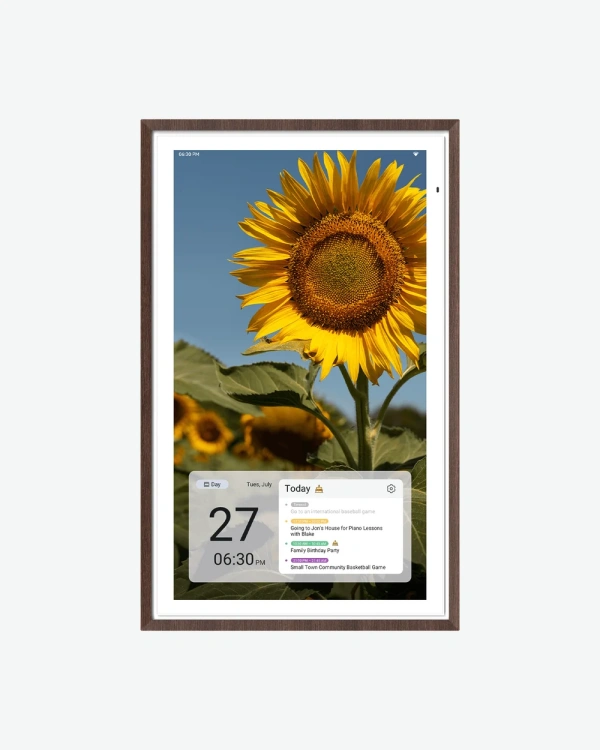
Where the 4K panel actually earns its price is photo display. Switch it to photo frame mode (through Google Photos, no subscription needed) and a sharper screen means less softness on detailed shots, something the standard 1080p panel can't quite match at this size.

It responds to "Hey Google" for voice control and connects to Google Home, so a doorbell feed or smart light status can show up without leaving the calendar screen. Google's Gemini AI chat is also built in for quick questions.

The anti-glare matte finish is worth calling out specifically here, Apolosign leads with it in the product listing for this model, which suggests the 4K panel can be a little more reflective without it. If this is going somewhere with bright, direct light, that finish is doing real work.
Pros and cons

What works

  • Noticeably sharper for displaying photos compared to the standard 27", the gap is harder to notice on calendar text alone
  • Same full feature set as the rest of the lineup, nothing is held back for the 1080p models
  • Anti-glare matte finish called out specifically for this panel, useful in bright rooms
  • Syncs with Google, Apple, Outlook and Yahoo calendars like every other size

What to know before buying

  • Only available in one finish (Dark Oak), the other sizes offer more color choices
  • The 4K upgrade is hard to justify if this will mostly show a calendar grid rather than photos, in that case the regular 27" does the same job for less

How it compares to the rest of the lineup

This sits at the top of the lineup alongside the standard 27", same screen size and features, different panel. If photo display matters to you, the sharper resolution is the reason to pick this one over the regular 27". If the calendar view is what you'll actually use day to day, the standard 27" covers the same ground for less and comes in more color options.

Who it's for

Good fit if you'll use the photo frame mode regularly, or you just want the sharpest panel available in this size.

Skip it if the calendar and chore features are the main draw, the standard 27" delivers the same functionality at a lower price.

Specifications

Screen size27 inch
Display typeLCD, 10-point touch
Resolution3840 x 2160 (4K)
Aspect ratio16:9

Common questions

Does it need a subscription?

No. The calendar, chore system, and photo frame mode all work without a monthly fee.

Is this different from the regular 27"?

Same size and features, the only difference is the display resolution, 4K here versus 1080p on the standard model.

What color options are there?

This model is available in Dark Oak only, the other sizes in the lineup offer more finish choices.

Can I manage it from my phone?

Yes, the calendar syncs with your existing apps, so changes made on your phone show up on the screen.

Does it come with a stand?

This isn't confirmed on the product listing for this size, so check the box contents before you buy if a desktop stand matters to you.

Not sure you need 4K?

If photo display isn't a priority, the standard 27" has the exact same features for less, and comes in more color options.